Configuration
It is possible to customize Taranta installation using a json file the src/config.json file
It contains the list of variables that are used to customize Wejive application.
Below are the different variables & their usage.
1. basename (string)
It is used by SKA to customize the domain in a k8s cluster. This contains the domain of the application.
For example, it could be integration, stageing etc. The default value for basename is empty ("").
2. MIN_WIDGET_SIZE (int)
This is used to define the minimum size (heigth & width) of widgets in the Dashboard section. Its default value is 20.
Unit is int and expresses the numer of the pixel. Every square in the dashboardis 10px x 10px
3. WIDGETS_TO_HIDE (string array)
It contains an array of widgets to hide in the Dashboard section. The array must contain [ char at the beginning, and ]
char at the end. Each value must be contained in " char, separated by comma ,.
The name of the available widgets are:
label, attributeDisplay, ``attributeWriter, attributeWriterDropdown, attributePlot, attributeScatter,
spectrum, spectrum2d, embedPage, fourChanScope, commandExecutor, commandWriter, Command, attributeDial, CommandFile,
CommandSwitch, booleanDisplay, DeviceStatus, ledDisplay, sardanaMotor, attributeLogger, attributeHeatMap, spectrumTable,
multipleCommandsExecutor
Its default value is an empty array []. It means that Taranta runs with all available widgets as default.
Example: A setting example that hide Command Swith and Command Array widgets is:
WIDGETS_TO_HIDE = ["CommandSwitch", "Command"]
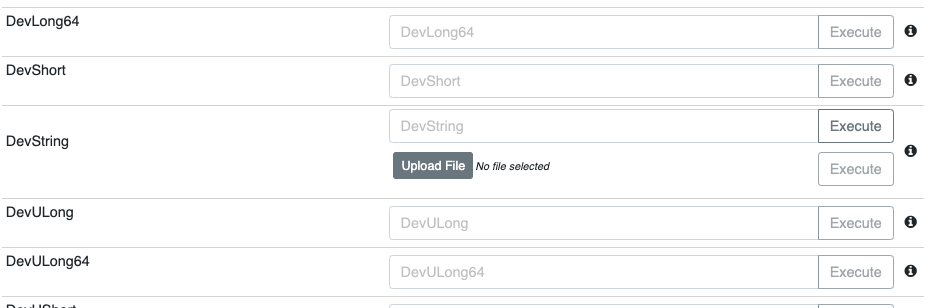
4. SHOW_COMMAND_FILE_ON_DEVICES (boolean)
This is a boolean variable if set to true, it allows users to upload a file to send as an argument in the
commands that accept DevString, in Devices section.
Its default value is false.
The component which permits uploading a file is the same as the Command File Widget.